Tuesday, March 15, 2011

Wee Willy Widget Shop ( Discrete Event System Simulation )

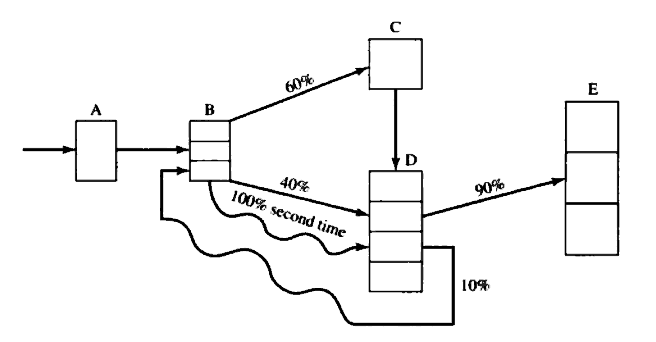
Problem: The Wee Willy Widget Shop overhauls and repair all types of widgets. The shop consists of five work stations, and the flow of jobs through the shop is as depicted here:
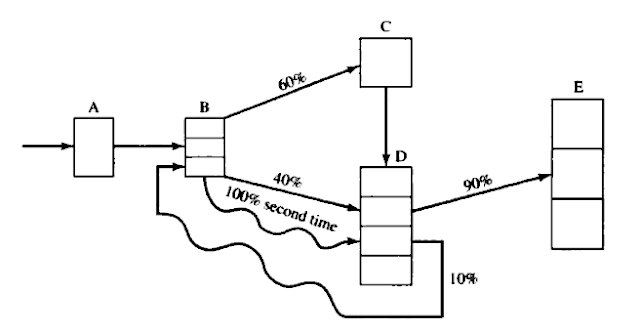
Regular jobs arrive at station A at the rate of one every 15 ± 13 minutes. Rush jobs arrive every 4 ± 3 hours and are given a higher priority except at station C, where they are put on a conveyor and sent through a cleaning and degreasing operation along with all other jobs. For jobs the first time through a station, processing and repair times are as follows:


The times listed above hold for all jobs that follow one of the two sequences A → B → C → D → E or A → B → D → E. However, about 10% of the jobs coming out of station D are sent back to B for further work (which takes 30 ± 10 minutes) and then are sent to D and finally to E.
Every 2 hours, beginning 1 hour after opening, the degreasing station C shuts down for routine maintenance, which takes 10 ± 1 minute. However, this routine maintenance does not begin until the current widget, if any, has completed its processing.
(a) Make three independent replications of the simulation model, where one replication equals an 8-hour simulation run, preceded by a 2-hour initialization run. The three sets of output represent three typical days. The main performance measure of interest is mean response time per job, where a response time is the total time a job spends in the shop. The shop is never empty in the morning, but the model will be empty without the initialization phase. So run the model for a 2-hour initialization period and collect statistics from time 2 hours to time 10 hours. This "warm-up" period will reduce the downward bias in the estimate of mean response time. Note that the 2-hour warm-up is a device to load a simulation model to some more realistic level than empty. From each of the three independent replications, obtain an estimate of mean response time. Also obtain an overall estimate, the sample average of the three estimates.
(b) Management is considering putting one additional worker at the busiest station (A, B, D, or E). Would this significantly improve mean response time?
(c) As an alternative to part (b), management is considering replacing machine C with a faster one that processes a widget in only 14 minutes. Would this significantly improve mean response time?


Solution: Code is written in C++ and there is also a pdf file containing the analysis for all three parts of this problem. It is available here.
Catenary - shape of a chain hanging from two points

Problem: Given a chain (string) or length L and it is hanged somewhere by fixed its both endpoints, but the euclidean distance between endpoints in 3D is less than L. And the chain have μ mass per unit length. Determine the shape of the resulting curve.


Commentary: Shape formed is known as Catenary in literature. Solution of this problem is precisely the shape of garlands hanging in weddings or temples. Mathematical treatment of this problem leads to some very interesting insight into the physical characteristics of these types of curves.


Analysis: A nearly complete analysis of this problem is given at http://en.wikipedia.org/wiki/Catenary#Alternative_analysis

Coding: Even though the equations are given on wikipedia page, it is unclear how to code to get the shape of curve given two endpoints and length of the string. But this problem was thoroughly discussed in NSDE lecture 04 (12-01-2011) by Prof. Atanu Mohanty. He gave some hints regarding how to implement it in C.
If you are interested in seeing the code it is available here.

Result:

Tuesday, September 7, 2010

Plotting a basic 2D graph using C + gnuplot (Tutorial)

In this tutorial we will learn how to draw a graph using ANSI C language with the help of gnuplot utility.

Step 1 write a c program using any editor. (here file name is plot.c) 

/*
 *      file: plot.c
 *
 *      Copyright 2010 Rooparam Choudhary <rooparam@rishi.serc.iisc.ernet.in>
 *
 *      Date : 07.09.2010
 *
 *      This program is free software; you can redistribute it and/or modify
 *      it under the terms of the GNU General Public License as published by
 *      the Free Software Foundation; either version 2 of the License, or
 *      (at your option) any later version.
 *    
 *      This program is distributed in the hope that it will be useful,
 *      but WITHOUT ANY WARRANTY; without even the implied warranty of
 *      MERCHANTABILITY or FITNESS FOR A PARTICULAR PURPOSE.  See the
 *      GNU General Public License for more details.
 *    
 *      You should have received a copy of the GNU General Public License
 *      along with this program; if not, write to the Free Software
 *      Foundation, Inc., 51 Franklin Street, Fifth Floor, Boston,
 *      MA 02110-1301, USA.
 *
 */


#include <stdio.h>

double func ( double x ) {
    if ( x < 0 )
        return 0 ;
    if ( x < 2 )
        return x * x ;

    return 16.0 / ( x * x ) ;
}

/*
 * output will be in 2 coloumns
 * 1 column contains x-axis values
 * 2 column contains y-axis {or f(x) } values corresponding to x-value
 */

int main ( ) {
    double x = 0.0;     // initial value
    double x_max = 5.0;
    double step = 0.01;
   
    printf ( "# x \t f(x) \n" );

    while ( x <= x_max ) {
        printf ( "%.3f \t %.3f \n", x, func(x) );
        x += step;
    }

    return 0;
}


Step 2 compile it and run it and grab the output in plot.txt file

            $ cc plot.c
            $ ./a.out >plot.txt

Step 3 Draw using gnuplot

            $ gnuplot
gnuplot> plot "./plot.txt" with lines


OK folks.
Tutorial is over.

This was just an introduction for plotting basic graphs. For more plotting tutorials and advanced plotting, just visit gnuplot .

See ya later.

Friday, August 27, 2010

Facts of Lagrange Interpolation

"Lagrangian interpolation is praised for analytic utility and beauty but deplored for numerical practice." This heading, from the extended table of contents of one of the most enjoyable textbooks of numerical analysis [1],expresses a widespread view. 

[...] Given (x0, f0), (x1, f1), . . ., (xn, fn) with arbitrary spaced xj, Lagrange had the idea of multiplying each fj by a polynomial that is 1 at xj and 0 at the other n nodes and then taking the sum of these n + 1 polynomials. Clearly, this gives the unique interpolation polynomial of degree n or less. [...]
                  ( Erwin Kreyszig, Advanced Engineering Mathematics )

Figure : Lagrange Interpolation of function 1/(1+x*x)


[...] Lagrange and other interpolation at equally spaced points, as in the example above, yield a polynomial oscillating above and below the true function. This behaviour tends to grow with the number of points, leading to a divergence known as Runge's phenomenon; the problem may be eliminated by choosing interpolation points at Chebyshev nodes. [...]
                  ( Wikipedia )

Although their are superior interpolation methods than lagrange interpolation method. But it is quite easy to understand and it is superior than Taylor Series Approximation of a function. It can be seen easily by following diagram.
Here I choose f(x) = e^x in the interval [0, 2]

[1]  F. S. Acton, Numerical Methods That [Usually] Work, AMS, Providence, RI, 1990.

Tuesday, March 30, 2010

twitter account

just removed 2 redundant accounts from twitter.com and now i have only 1 twitter acct and its http://twitter.com/rrc_iisc

Friday, December 11, 2009

Area Filling Algorithms (seed filling, ScanLine conversion)


  1. #include <graphics.h>


  2. #include <iostream>


  3. #define ROUND(x) ((int)(x+0.5))


  4. typedef int Point[2];           // P[0] - x coordinate P[1] - y coordinate


  5. void seedFill(int x, int y, int color) {


  6.      if(x > 640 || x < 0 || y > 480 || y < 0)


  7.           return;


  8.      if(getpixel(x, y) == BLACK) {


  9.                        putpixel(x, y, color);


  10.                        seedFill(x+1, y, color);


  11.                        seedFill(x-1, y, color);


  12.                        seedFill(x, y+1, color);


  13.                        seedFill(x, y-1, color);


  14.      }


  15. }


  16. void scanlineFill(Point *polygon, int nodes, int color) {


  17.      setcolor(color);


  18.      Point array[480];


  19.      for(int i=0; i<480; ++i) {


  20.              array[i][0] = 640;


  21.              array[i][1] = 0;


  22.      }


  23.    


  24.      for(int i=0; i<nodes; ++i){


  25.              Point p1, p2;


  26.              p1[0] = polygon[i][0];   p1[1] = polygon[i][1];


  27.              p2[0] = polygon[(i+1)%nodes][0];               p2[1] = polygon[(i+1)%nodes][1];


  28.              if(p1[1] > p2[1]) {


  29.                       p2[0] = polygon[i][0];   p2[1] = polygon[i][1];


  30.                       p1[0] = polygon[(i+1)%nodes][0];               p1[1] = polygon[(i+1)%nodes][1];


  31.              }


  32.              double m = (double)(p2[1]-p1[1])/(p2[0]-p1[0]);


  33.              double xd = p1[0] - 1/m;


  34.              for(int y=p1[1]; y<=p2[1]; ++y) {


  35.                      xd += 1/m;


  36.                      int x = ROUND(xd);


  37.                      if(array[y][0] > x)


  38.                                     array[y][0] = x;


  39.                      if(array[y][1] < x)


  40.                                     array[y][1] = x;


  41.              }


  42.      }


  43.    


  44.      for(int i=0; i<480; ++i)


  45.              if(array[i][0] < array[i][1])


  46.                             line(array[i][0]+1, i, array[i][1]-1, i);


  47. }


  48. void drawPolygon(Point *polygon, int nodes) {


  49.      setcolor(WHITE);


  50.      for(int i=0; i<nodes; ++i){


  51.              Point p1, p2;


  52.              p1[0] = polygon[i][0];   p1[1] = polygon[i][1];


  53.              p2[0] = polygon[(i+1)%nodes][0];               p2[1] = polygon[(i+1)%nodes][1];


  54.              line(p1[0], p1[1], p2[0], p2[1]);


  55.      }


  56. }


  57. int main(){


  58.     int gd = DETECT, gm;


  59.     initgraph(&gd, &gm, "C:\\");


  60.     Point polygon[20];


  61.     int size = 0;


  62.     while(true) {


  63.                 std::system("cls");


  64.                 std::cout << "Enter size of polygon : (-1 for exit) : ";


  65.                 std::cin >> size;


  66.                 if(size == -1)


  67.                         return 0;


  68.                 if(size > 20){


  69.                         std::cout << "Enter size less than 20" << std::endl;


  70.                         continue;


  71.                 }


  72.                 for(int i=0; i < size; ++i) {


  73.                         std::cout << "Enter vertex : (x y) : ";


  74.                         std::cin >> polygon[i][0] >> polygon[i][1];


  75.                 }


  76.                 drawPolygon(polygon, size);


  77.                 FILL:


  78.                 std::system("cls");


  79.                 std::cout << "Choose an algorithm to fill." << std::endl;


  80.                 std::cout << "\t1. seed fill" << std::endl;


  81.                 std::cout << "\t2. scan line fill" << std::endl;


  82.                 std::cout << "choice: ";


  83.                 int choice;


  84.                 std::cin >> choice;


  85.                 switch(choice) {


  86.                                case 1:


  87.                                     {


  88.                                         std::cout << "Enter a point inside polygon: (x y) : ";


  89.                                         Point p;


  90.                                         std::cin >> p[0] >> p[1];


  91.                                         seedFill(p[0], p[1],RED);


  92.                                         break;


  93.                                     }


  94.                                case 2:


  95.                                     scanlineFill(polygon, size, BLUE);


  96.                                     break;


  97.                                default:


  98.                                        std::cout << "I can't interpret your choice." << std::endl;


  99.                                        goto FILL;


  100.                                        break;


  101.                 }


  102.     }


  103. }